The Golden Age of Apple Software Ended with Snow Leopard
Apple once shipped a server a 12 year old could run. I rebuilt it in a VM to find out whether it still holds up in 2026, and what can be learned by examining the past.

Before jumping into this article, and before scaring you with the worst of it, which is naturally the first section, please take note that this article is full of screenshots, PDF resources, and a much easier to read troubleshooting runbook later on. The first part is meant to be a little painful to read and it’s the most technical part. If you want the heart of the article, gloss over the technical stuff, don’t sweat it. Jump ahead to how a 12 year old ended up running a server, or straight to the screenshots.*
The pain of 2009 operating systems in 2026
Building the VM took the better part of a week, and almost none of that week was Snow Leopard’s fault. We have amazing tooling in 2026, yet much of it is still systemically flawed by a fractured system. Let’s start this story by diving into what actually went wrong.
Three separate OpenCore configurations refused to show the installer in the boot picker, because OpenCore expects the UEFI-era conventions that Snow Leopard predates and the 10.6 installer volume uses an Apple Partition Map rather than the GPT layout everything after it uses. If only I had realized all of that sooner. Once I gave up on OpenCore and went back to a bootloader that was contemporary with the operating system, Chameleon 2.1, the VM entered an immediate reboot loop that looked a lot like a corrupt bootloader image. As a result, I wasted time changing Q35 machine versions before working out that the real cause was KVM injecting a general protection fault every time the guest touched a model-specific CPU register it doesn’t emulate. After some reading, I set ignore_msrs=1 on the hypervisor’s config which did the trick. Then the Nehalem CPU model kept resetting the guest during the Darwin kernel handoff from the Chameleon bootloader, so I switched to Penryn. Then the Chameleon ISO attached as SATA optical media produced a stream of SerialATAPI Terminating due to unrecoverable Reset error, so I moved it to IDE. Then the QEMU tablet pointer caused USB enumeration stalls, so I disabled it and put the keyboard on the second EHCI controller. Then Snow Leopard panicked on two vCPUs with panic(cpu 1 ...): Spinlock acquisition timed out, so now it runs on one.
And then, after all of that, with the operating system installed, networking up, and SSH working, I updated from 10.6.3 to 10.6.8 and Screen Sharing promptly refused every connection thereafter. I spent an embarrassing amount of time on Apple Remote Desktop access control, running kickstart with every combination of privilege and user scope I could think of, enabling VNC legacy mode, writing a password hash directly into /Library/Preferences/com.apple.RemoteManagement.vncpasswd with a perl one-liner, unloading and reloading launch daemons, and eventually flushing the entire ipfw ruleset and unloading the application firewall kext, all of which achieved nothing, because as it turns out, the problem was a daemon that was segfaulting on startup. As logic would have it, something that never finishes starting can’t be configured into working afterward…
The answer was in the crash reports the whole time, so after wasting time configuring, I took a look and found: AppleVNCServer was dying in __memcpy with a bus error, and the register state showed that it was copying 4096 bytes per scanline while the actual framebuffer rows were 2048 bytes, overrunning the mapped region by 2048 bytes on every single frame. Apple’s VNC server assumes a 32-bit framebuffer, and QEMU’s default Cirrus adapter was handing it a 16-bit one, with 1 MB of VRAM that couldn’t have held a 32-bit 1024x768 framebuffer anyway. I changed the display adapter to VMware SVGA II with 32 MB, restarted the guest, and Screen Sharing came up and stayed up. Oh my poor pride after declining to accept what so many blog posts and even ChatGPT offered as the answers to a successful configuration- “VMware SVGA display? Nonsense, the display can’t possibly be so needy after over a decade of development”. Sigh.
The 2009 code was correct throughout, and the 2024 emulation layer handed it a framebuffer half the depth it expected, which produced a failure that looked for at least a couple hours like an authentication/networking problem. Every obstacle in that list is something modern virtualization did to a piece of software that installed cleanly, booted cleanly, and once it was running behaved exactly as I remembered it behaving when I was a kid. Cue harp flashback music
How it got to the dining room
I had a head start on the internet compared to most of my peers, largely because the classroom was a bad place for me and the internet wasn’t. Technically underage, I started working at an Apple Authorized Repair facility, and I kept working there until the owner died. The shop had loads of half-working Macs, and I bought three 2006 iMacs out of it, you know, the hard white plastic ones. Two 20-inch machines and a 24-inch that I paid real money for on eBay instead of in-kind or as gifts from the shop. One of the 20-inch iMacs had no integrated display at all (which is why it was free), so I could see straight into its internals whenever I liked. It ran on a DVI to VGA adapter and an external monitor, which turned out to be a net gain because the external panel was higher resolution and I learned something about display calibration in the process.
By then the machines were already 5 or 6 years old. One lived on the desk in my grandfather Dennis’s dining room, and the other two lived in my bedroom, until I eventually moved the second one downstairs to join the first. Add my mother’s old 2009 MacBook and, later, my own thick Asus ROG G750M laptop running Windows, and I had a little fleet spread across two houses.
The fleet was not very good at games, my primary interest in those days beyond Wikipedia. Plants vs. Zombies and Dota 2, both written in C++, ran admirably. Minecraft, written in Java, could barely hold 20 frames per second on anything except the Asus. What actually mattered, though, was the ceiling: both iMacs topped out at 4 GB of RAM, permanently, and RAM in the early 2010s cost roughly what it costs in 2026, so stuffing a current Mac to the limit was not happening on my budget. Gaming needed voice comms, game servers, and a VPN, so I learned TeamSpeak and LogMeIn Hamachi. Game servers were never my forte as they needed single-core performance I didn’t have but that my friends’ i7 desktops did. The problems I could actually solve were the memory bottleneck and the storage shortage, and solving those meant a server.
I found out how from QDMac, where I’d learnt about Apple’s secret proprietary diagnostic server, and about Xserve, and about Mac OS X Server. The shop owner was kind enough to give me a licence and a DVD, which I recognized as more than a shiny mirror and gobbledegook thanks to games like Age of Empires, which also came in a DVD with a license key. So that’s how a 12 year old came to be running a $499 unlimited-client server operating system in his grandfather’s dining room, and admittedly I’ve never entirely lost the sense that this was an accident of circumstance rather than anything I had up until that point actually earned. After that cataclysmic moment in the destiny of my life, when it should have been pretty obvious from then on that I was going to do well in computers, I still struggled to nail down a future career, in so much as I aimed for other things and repeatedly fell back into what that DVD and license key had made me best at…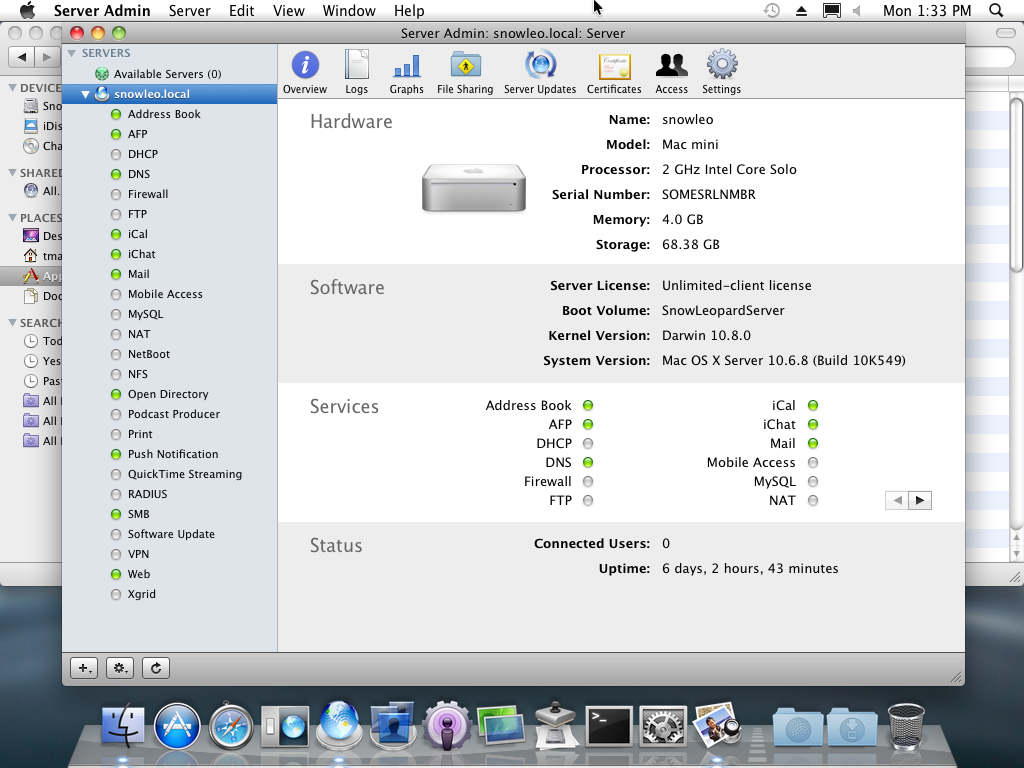
Snow Leopard Server, 10.6 through 10.6.8, was the last version that remained an operating system rather than an app. Lion Server arrived in 2011 as a download, the price collapsed from $499 to $49.99, Server Admin and Workgroup Manager dissolved into the ether, and the long amputation process of the product line had begun. By Server 5.7.1 in 2018, a decade later, almost everything was gone. This left Profile Manager, Open Directory, and Xsan, but Xsan went in Server 5.12, Open Directory followed, and by the time Apple discontinued macOS Server outright on April 21, 2022, there was a single feature left in it.
Thirty minutes
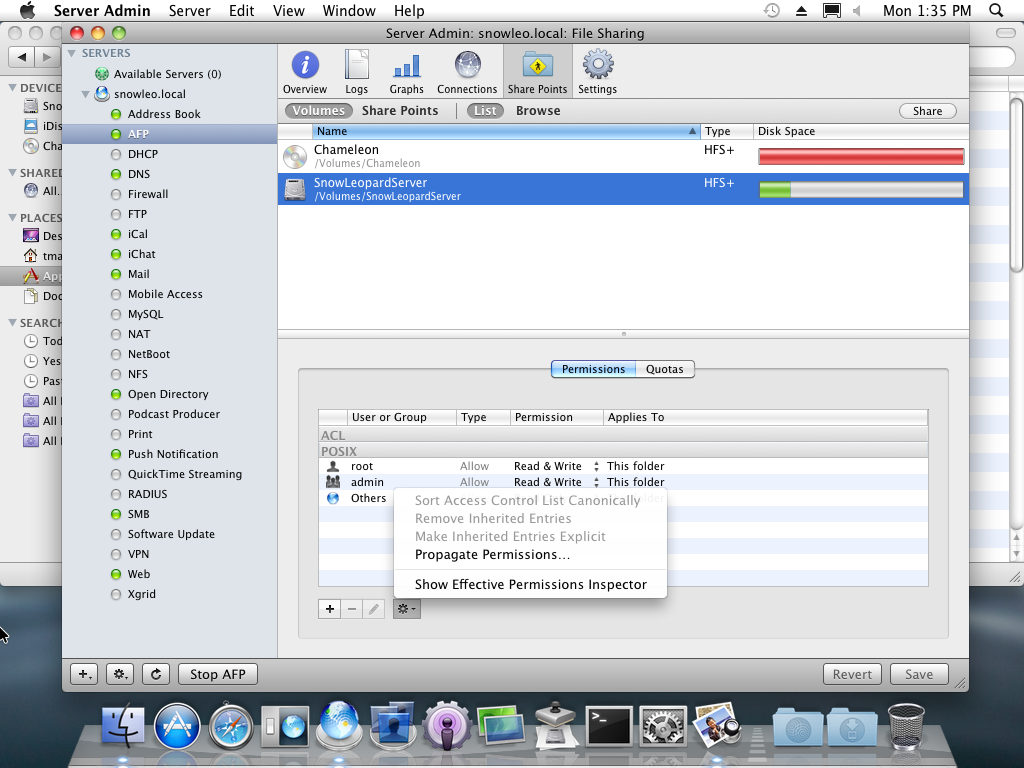
As a complete novice, with no understanding of computer networking and no formal education on computers beyond typing class, I deployed an L2TP VPN and a PPTP VPN, separately, in under 30 minutes. I used them for gaming and for remote access to my file server, and so did my friends. The file services and the VPN were the two things that got real weekly use, and to my pride they worked reliably.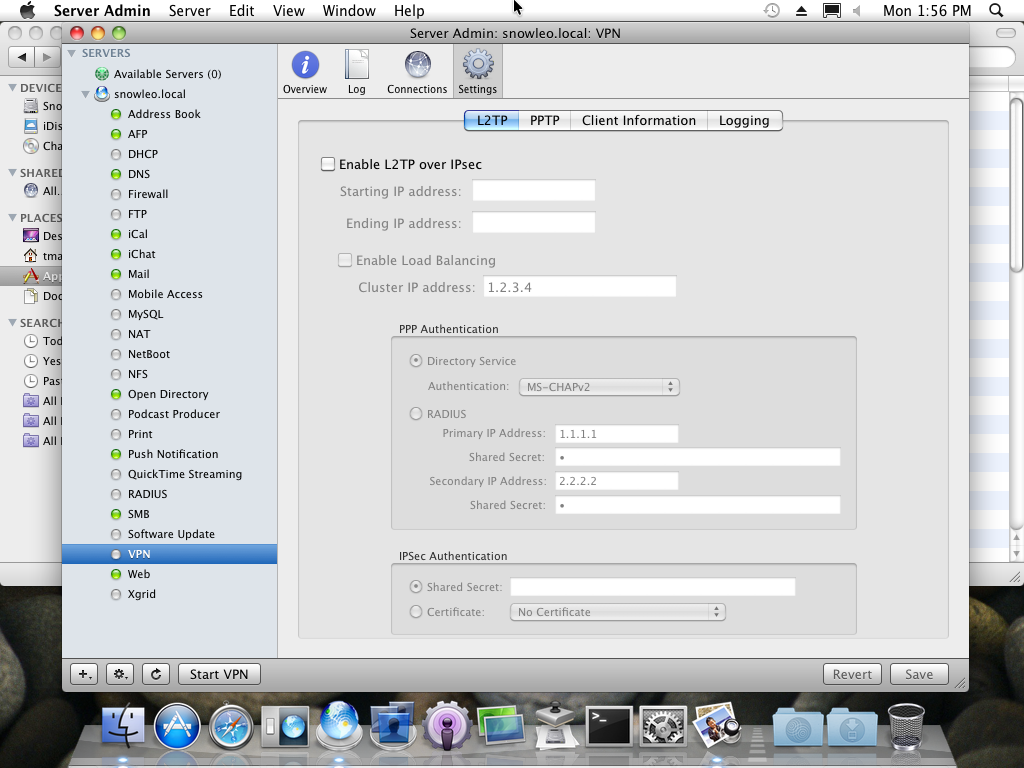
I spent years afterward failing to reproduce what I had in a dining room as a child. Microsoft’s RRAS and Linux OpenVPN both cost me far more than 30 minutes, and the troubleshooting issues were never the interesting kind. It was almost never NAT traversal, almost never certificates, almost never the firewall. It was the server and client configuration files disagreeing with each other. It was getting the client config onto client machines at all. It was address pools and routing quietly failing. It was persuading the router or the firewall to cooperate with a new OpenVPN or RRAS server, which usually ended with me enabling NAT on the VPN server itself just to avoid having to add routes anywhere else (still true today). Only once OpenVPN install scripts existed, and once WireGuard picked up a web console, did I get back to something like the pace of a 13 year old with a DVD…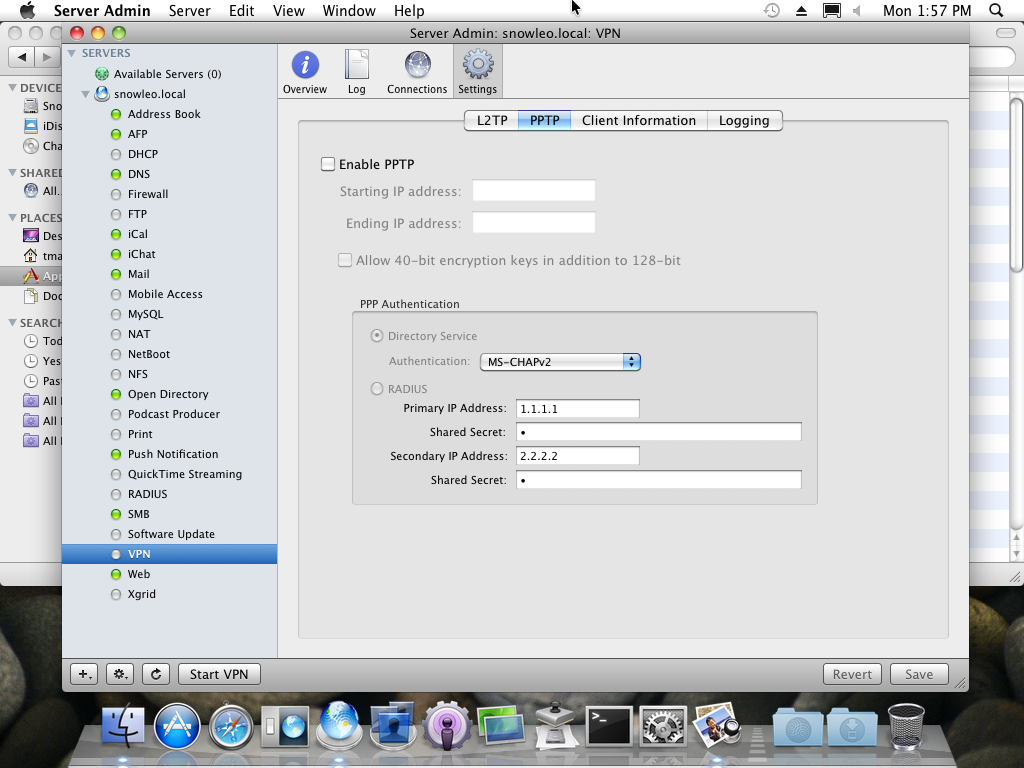
WireGuard deserves a specific complaint here, because the usual defence of it is that the configuration is succinct, and that any difficulty is really the architectural design of your environment. Well that wasn’t my experience, let me tell you. My architecture was decided in advance and written down, because I take documentation seriously and have my own BookStack server for a reason, yet I still spent hours on troubleshooting. No, the problem was decidedly not my lack of planning or experience with VPNs, it turns out WireGuard has unnecessarily weird vocabulary. AllowedIPs does two unrelated jobs depending on direction, acting as a cryptokey routing table on the way out and an access control list on the way in, which means the same line means different things to the two ends of the tunnel. Peer describes a relationship that is usually asymmetric as though it were symmetric. Endpoint is required on one side, optional on the other, depending on who initiates, which sort of defeats the purpose of calling it an endpoint. And there is no term at all for the thing every other VPN product on earth calls an address pool, so “VPN pool” would have served, and instead you get to infer it from a subnet mask in AllowedIPs. None of that was forced by their “innovating technology”, it’s entirely a naming choice, and naming choices are where my deployment time unfortunately ended up going.
What the $499 actually bought
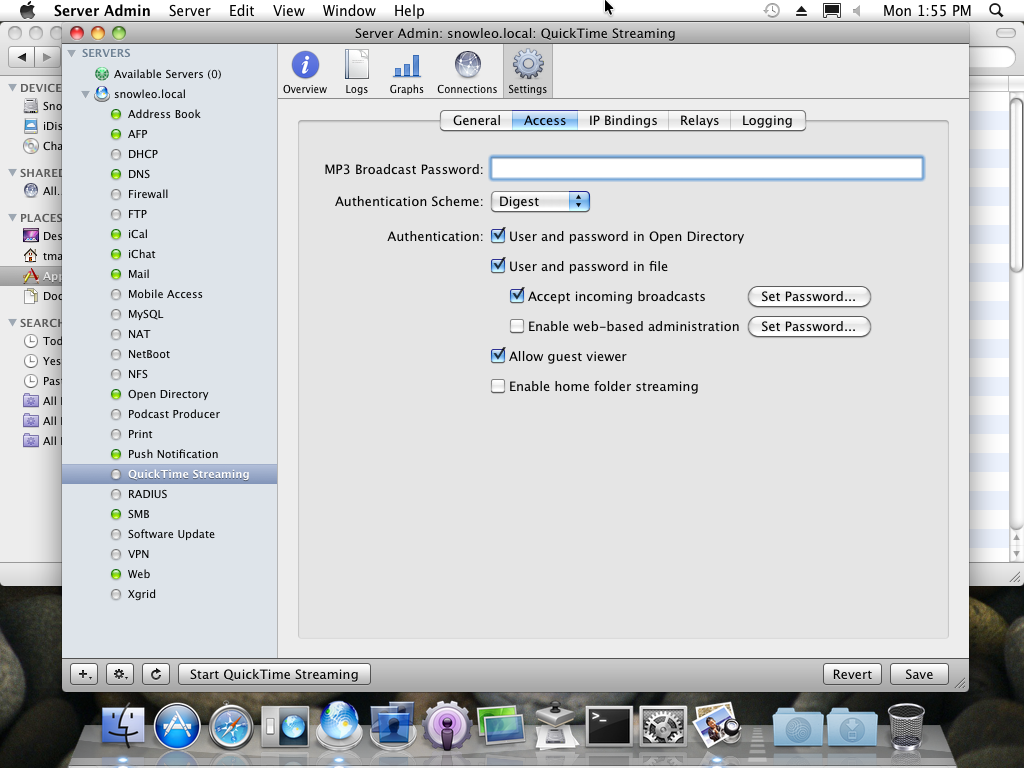
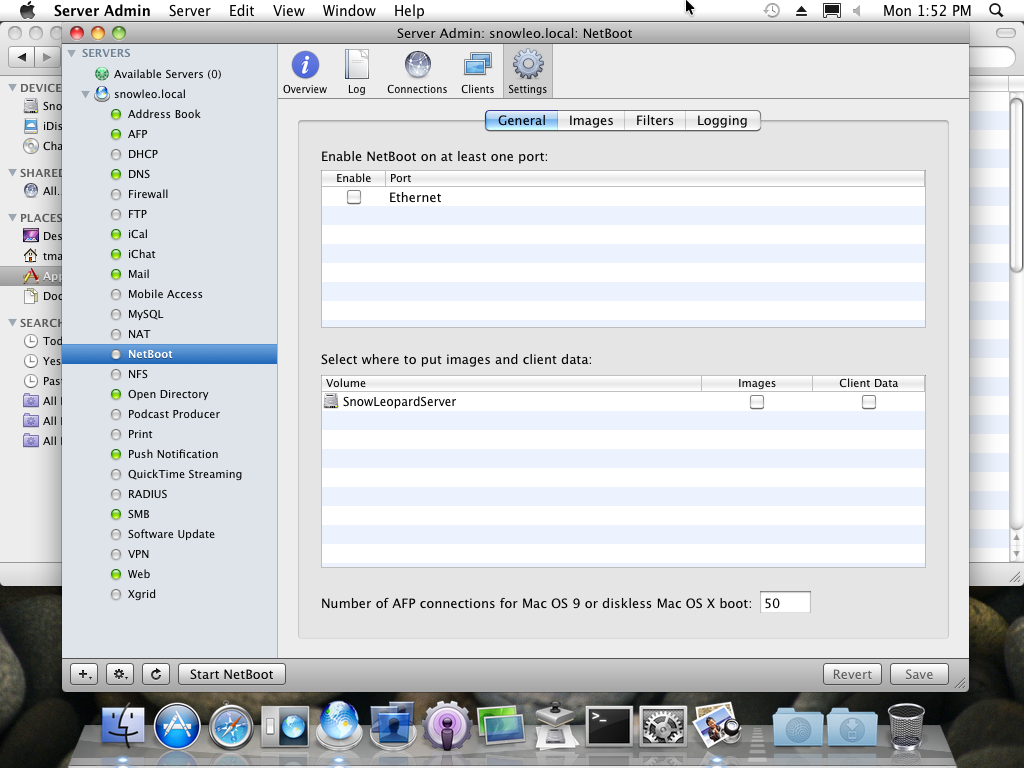
Snow Leopard Server was a curated open source stack, and Apple’s own documentation does a good job of declaring this without any signs of embarrassment. Postfix and Dovecot for mail, with Mailman, SquirrelMail, ClamAV, SpamAssassin and Amavis around them. Apache 2.2 with MySQL, PHP, Tomcat, and Ruby on Rails through Mongrel. BIND and ISC DHCP. ipfw for the firewall and racoon for L2TP. FreeRADIUS. Samba 3 and NFS. OpenLDAP with MIT Kerberos underneath Open Directory. jabberd2 behind iChat Server, the Twisted-based CalendarServer behind iCal Server, CUPS for printing, Darwin Streaming Server for QuickTime. The Advanced Server Administration guide puts the count at over 100 open source projects. So the comparison between Apple’s software and Linux software in 2009 is mostly a comparison between a curated ecosystem and the ecosystem’s individual components.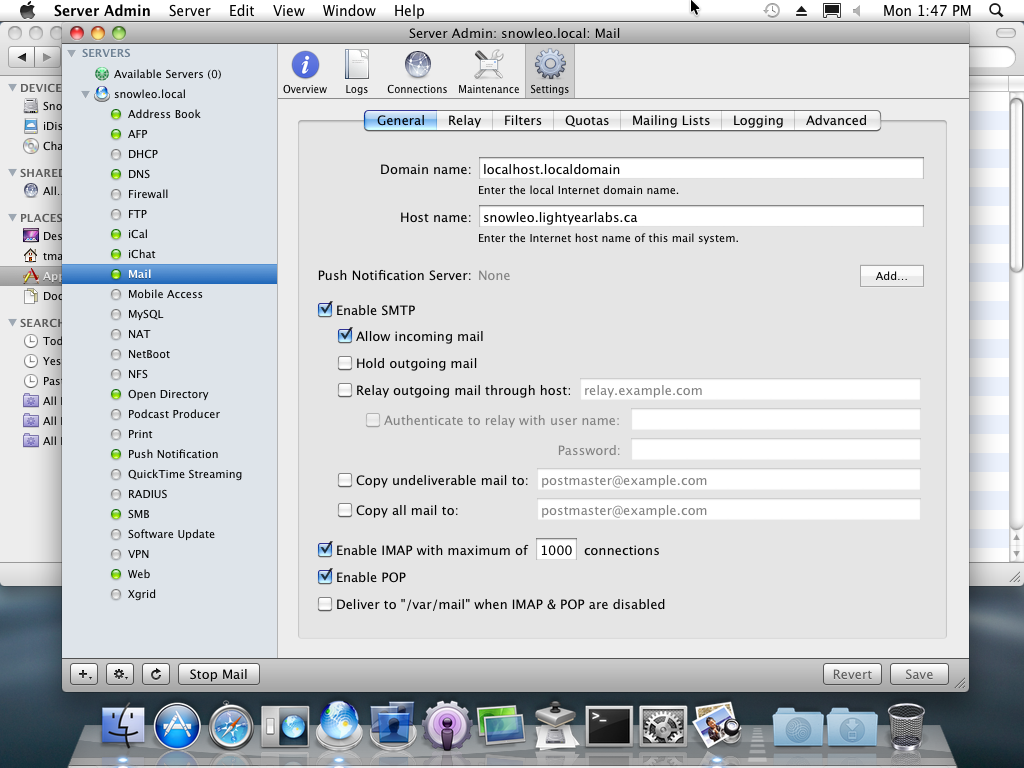
Maybe the most important infrastructure piece was the directory. One Kerberos realm, one set of accounts, and every service on the box authenticating against it. That’s why the L2TP deployment took only 30 minutes. A user typed the password they already had, and the server had nothing to hand them, no key to generate, no profile to install, no per-client provisioning of any kind. What Tailscale sells for money today is precisely the piece that Open Directory gave away for free in 2009 by the simple expedient of already knowing who the users were.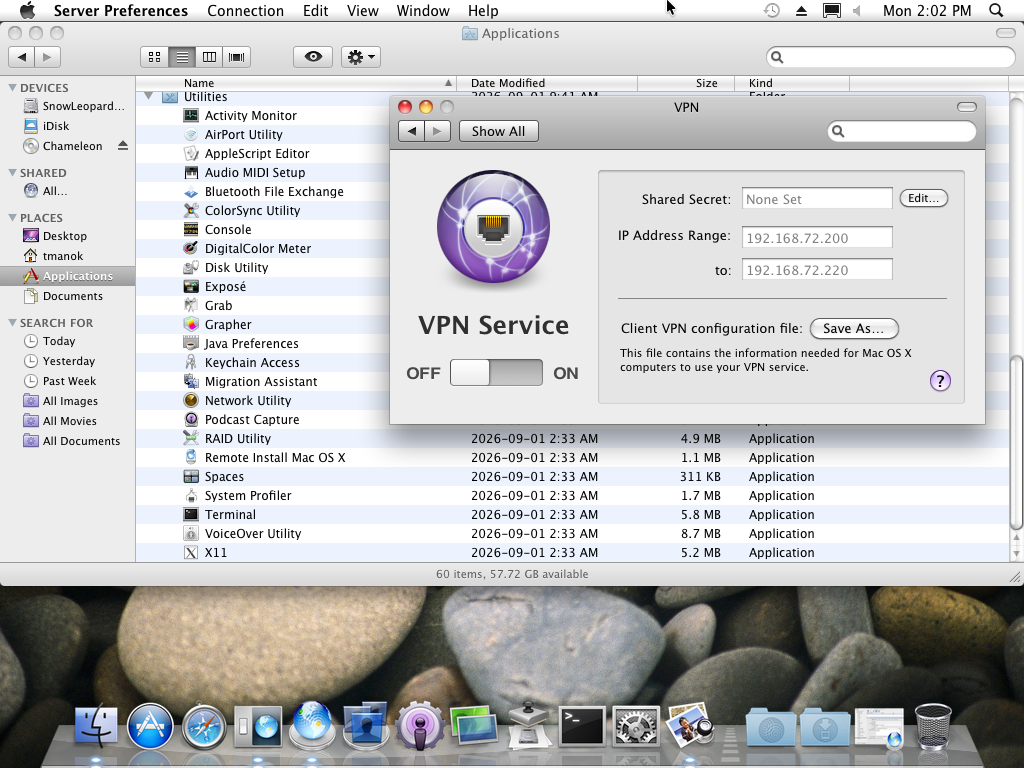
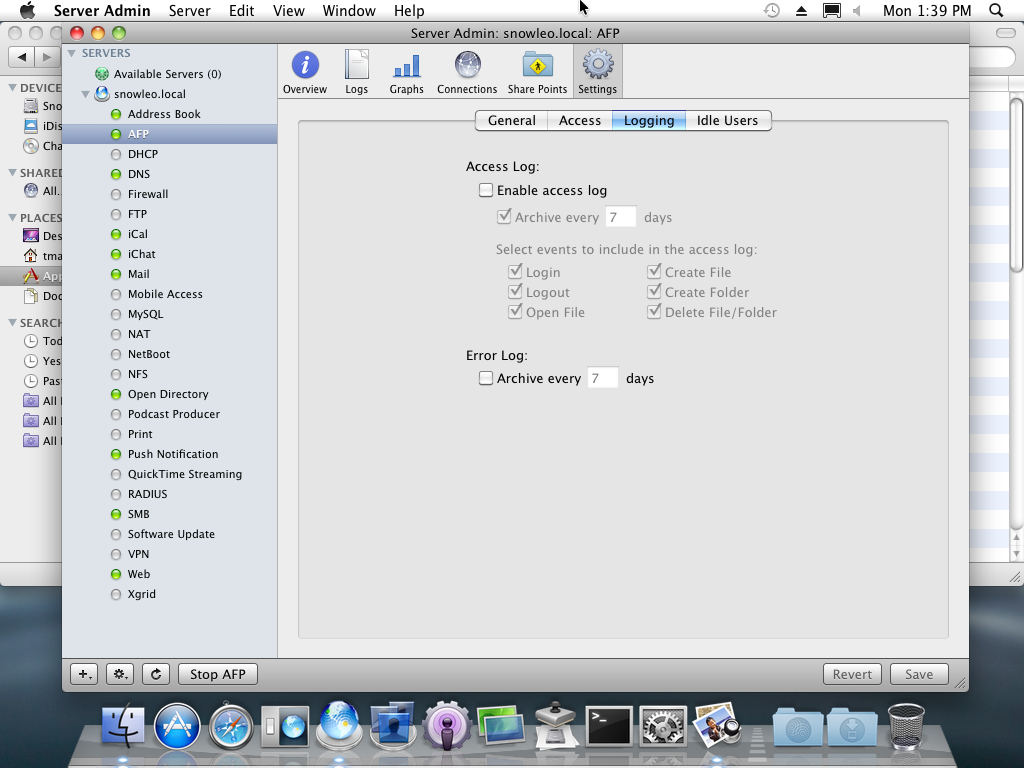
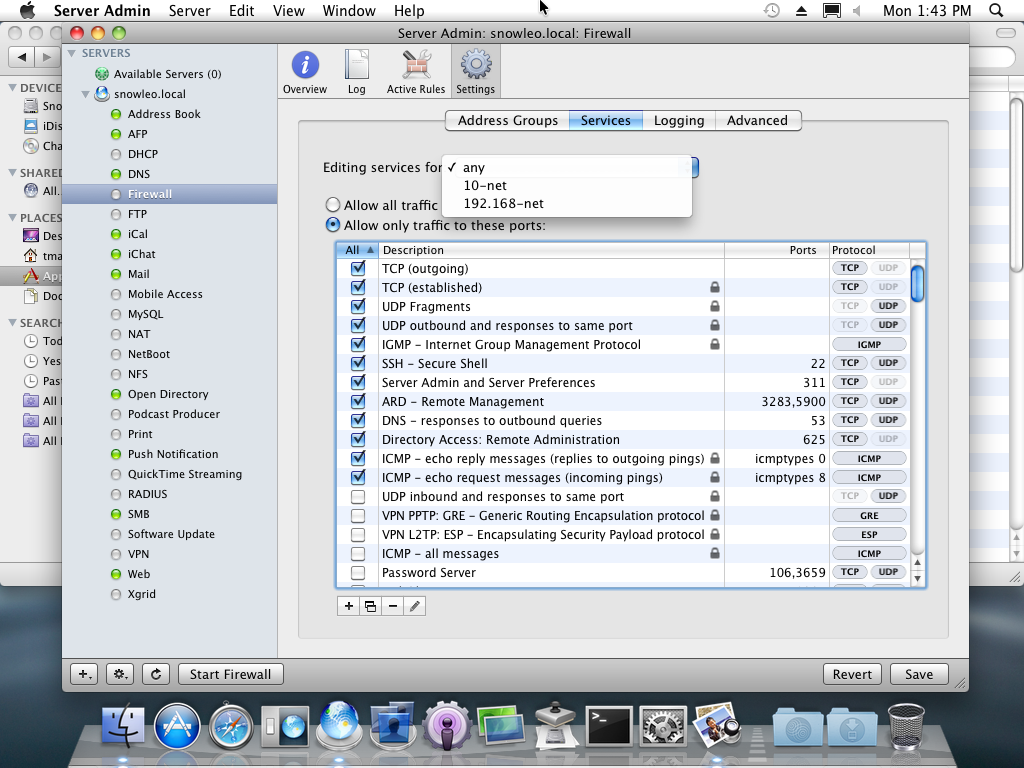
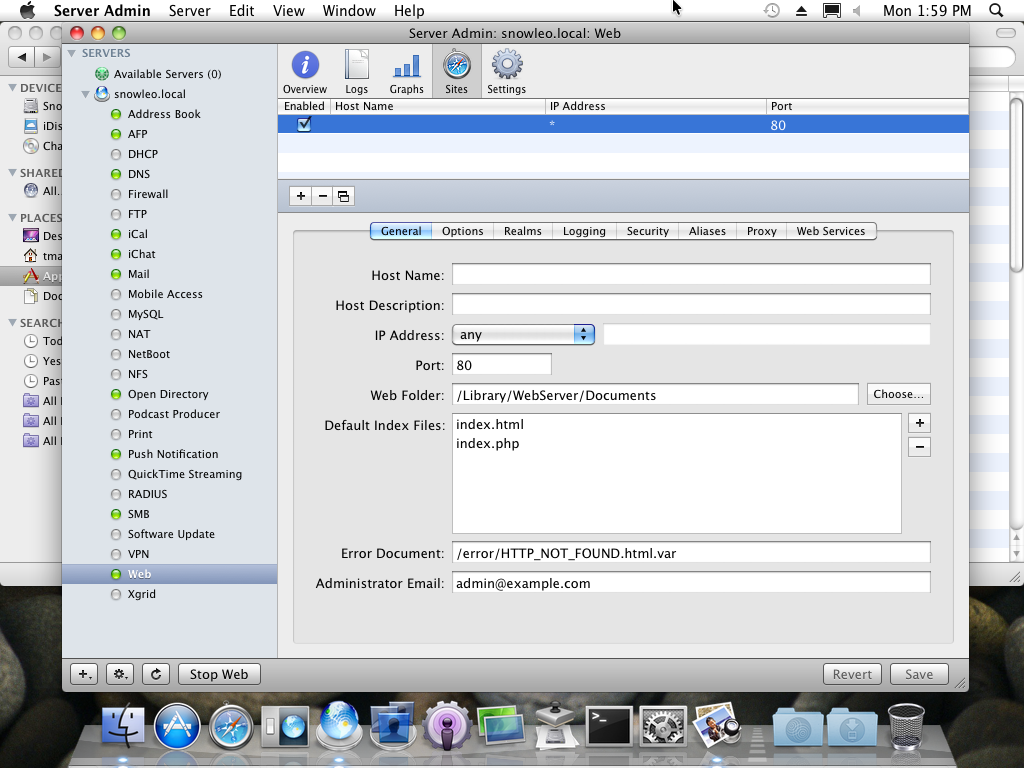
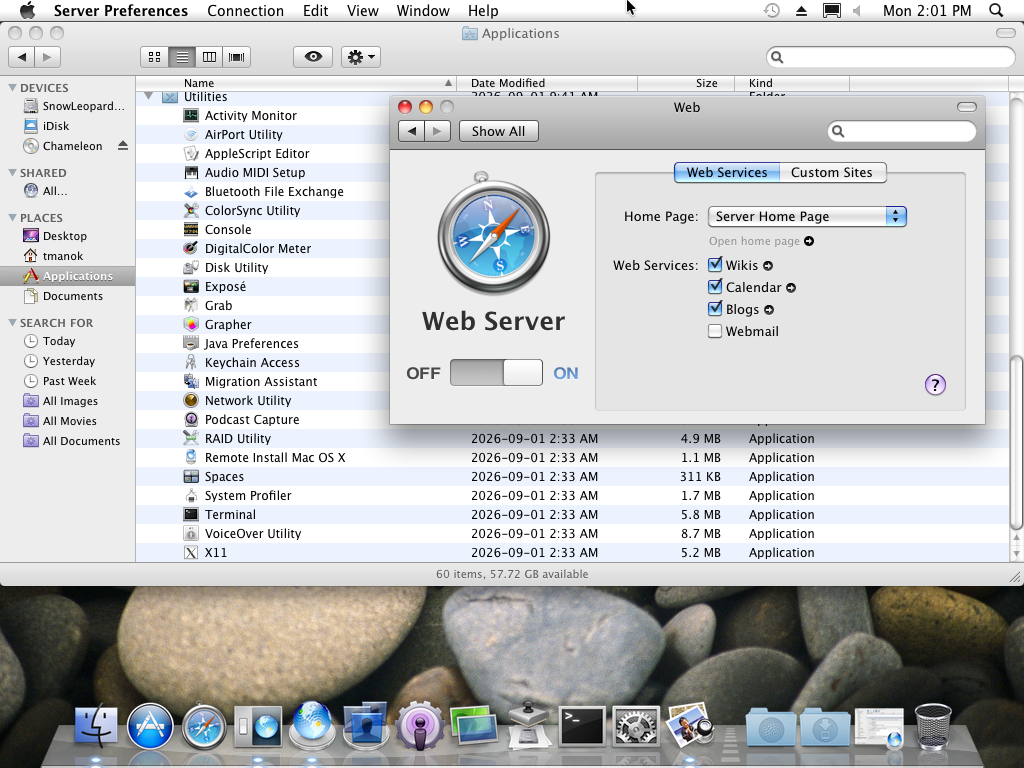
The thing that made the infrastructure accessible and configurable was the escalation ladder, which I don’t think anyone else has shipped before or since, not to this extent or with this much polish. There were three tiers, and all three read and wrote the same state. Server Preferences at the bottom, for standard configurations, where you were asked almost nothing in order to toggle a service on or off. Server Admin and Workgroup Manager in the middle, for full control. And serveradmin on the terminal with the rest of the underbelly commands, mostly for scripting. The guides say explicitly that you could move between the first two and see your changes reflected in both. Opinionated at the bottom, unopinionated at the top, same state throughout. Webmin was only ever the top rung, faithfully exposing every knob in every config file and making no choices for you. Windows Server was the top rung with wizards bolted on, and the moment you stepped outside a wizard you were in the Exchange Management Console, ADUC, Group Policy Management, DNS Manager, and IIS Manager, each with its own vocabulary and its own documentation team… Frightening does not begin to convey the early days of that product line.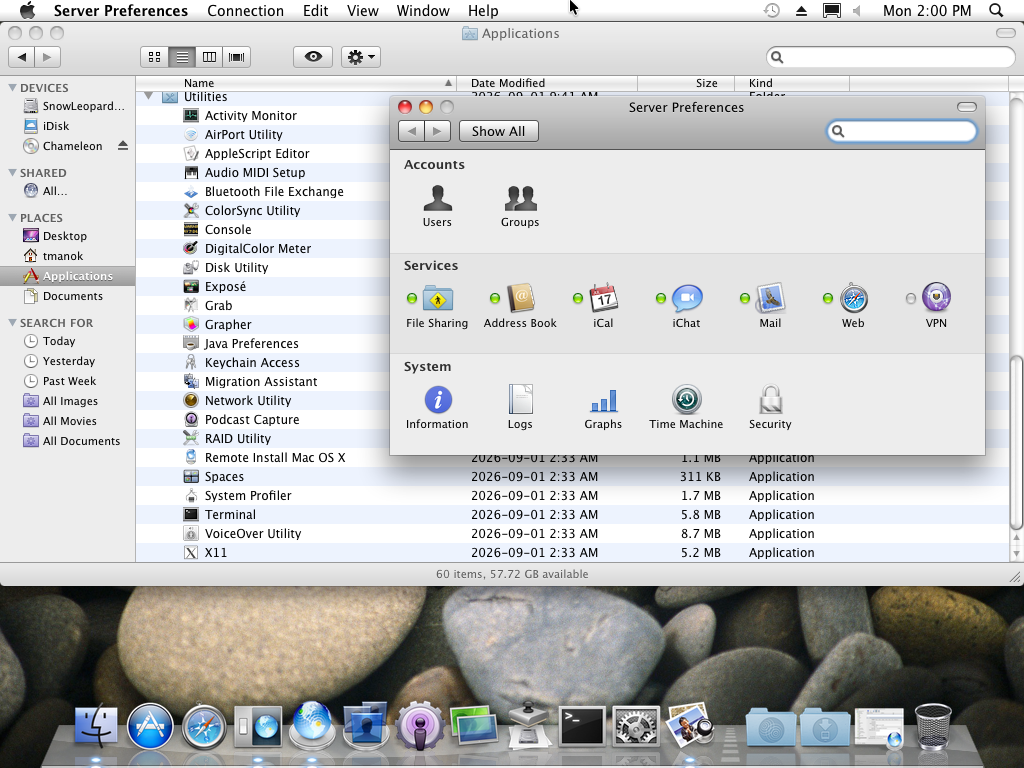
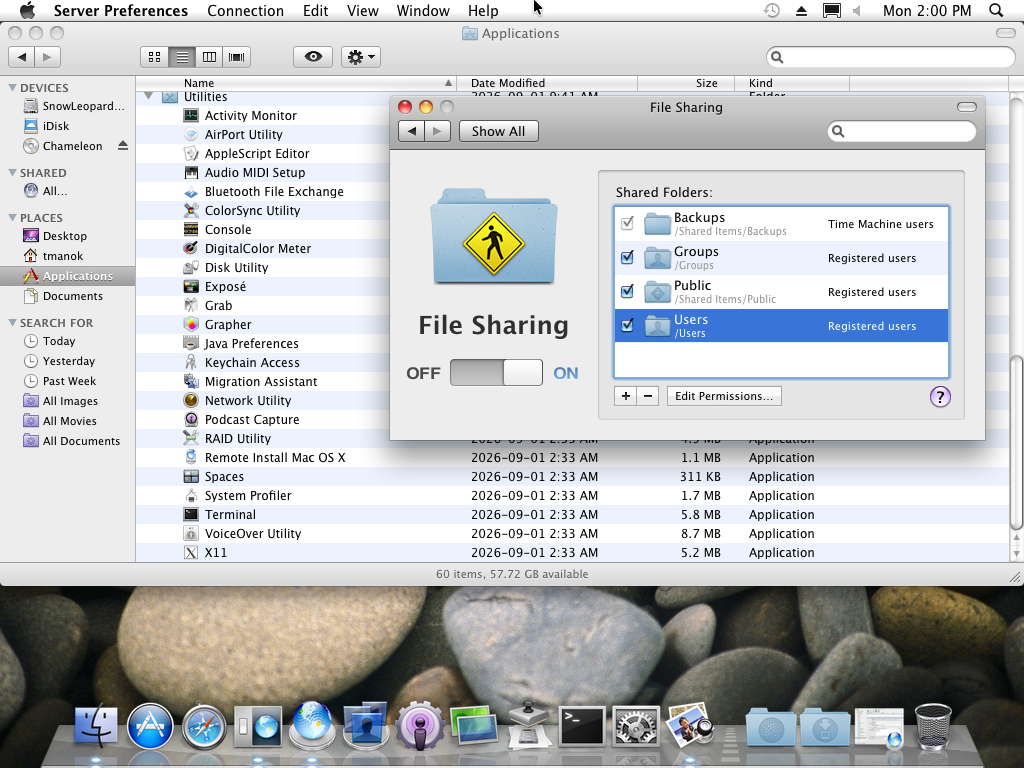
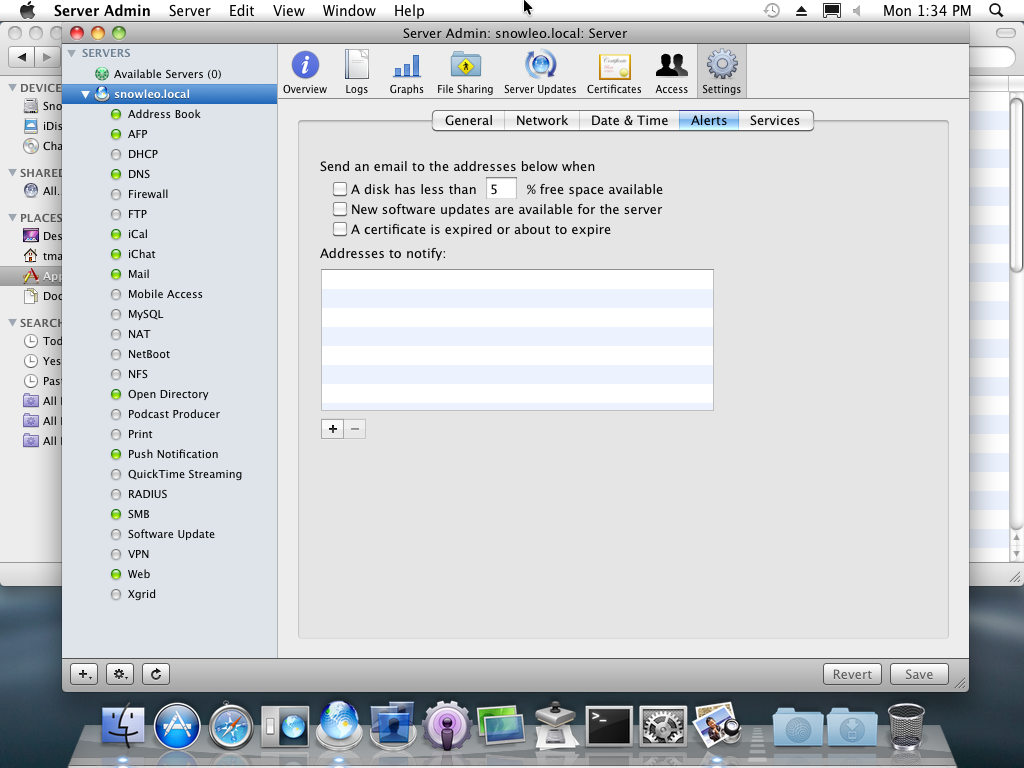
The usual objection here is that the GUI owning the configuration files is a liability, that Server Admin would silently overwrite a hand-edited main.cf, and that when the GUI’s model and the file drifted apart you were worse off than on a Linux box where the file is the only truth. I’ve heard that argument and I don’t find it as damning as people want it to be. Plenty of systems put a database in front of a config file. What it really means is that the GUI is assumed to work in every case and therefore has to be well tested, and in Apple’s case it really was. If an organization needed to customize beyond what the GUI allowed, it had the resources and the technical staff to stand up a Linux box with the raw editing power it wanted. For a few hundred users, which is what Mac OS X Server was scoped to, that almost never came up.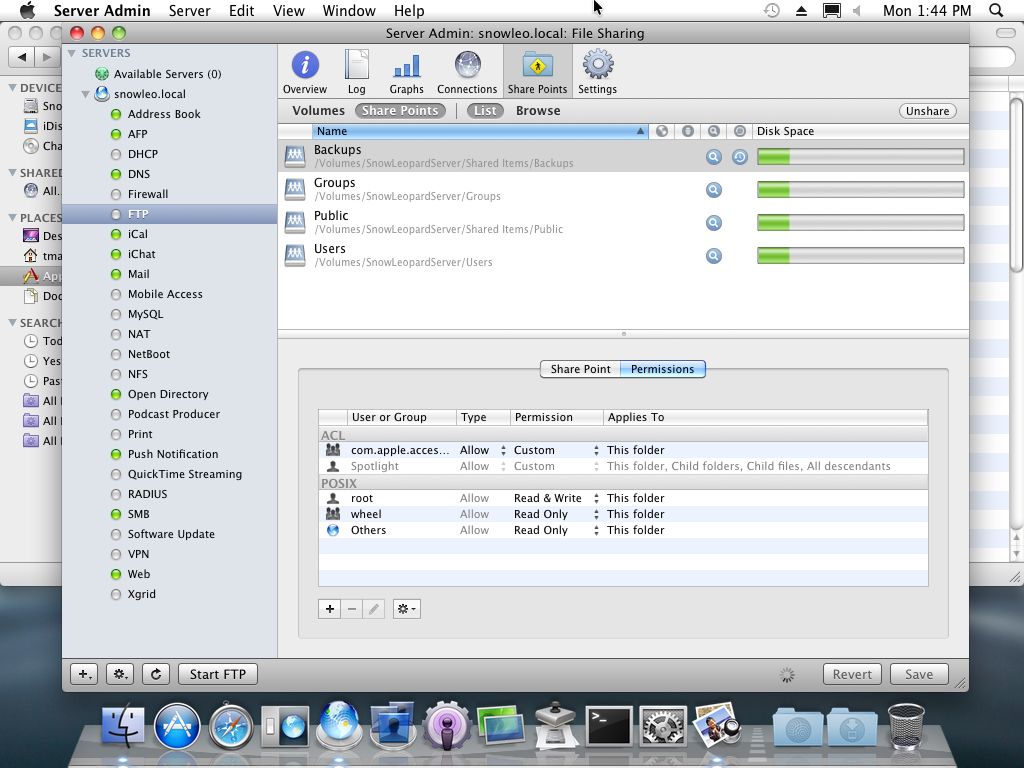
The lowest priority
There’s a line of thinking in software development that documentation gets prohibitively expensive as a system grows more complicated, and that the effort is therefore better spent elsewhere as the project grows more technically complex. I think that’s exactly backwards, and I think it’s the sort of conclusion only people who already understand the system can talk themselves into. The usability of a product, for anyone who isn’t willing to learn it as a black box through mailing list archaeology and IRC, depends entirely on documentation. Without it, who understands your project well enough to use it, let alone deploy it?
I’m not claiming the “why” always has an obvious outline to it, especially when the options are close to endless there may be more valid answers than the developers or the product owners ever realized. But there has to be guidance that establishes the purpose of a piece of software, the workflow it generally expects, what it’s actually capable of, and only then the technical instructions. Especially for infrastructure software, where the audience is mostly non-developers, it’s easy for the creators to assume that the primary users are also developers because it’s self-reinforcing. When a product is at its least documented, some of the only people who can produce useful feedback are themselves developers, which confirms to everyone involved that developers are the main audience.
Snow Leopard Server barely needed its documentation, which is the point. It was the cherry on top of a product that had already made most of the decisions for you. Every guide opened with an “Understanding X” chapter before it let you touch “Setting Up X”. There was a Documentation Map telling you which guides depended on which. The Open Directory guide spends three chapters on search policies, password types, Kerberos realms, and replica topology before it lets you enable anything, and it runs to 298 pages. And there was a Getting Started guide, written for someone who had never done this before, which is a literary form quickly disappearing, and where it does survive it almost never reaches the bar of accessibility Apple set in 2009. Its replacement is a docker-compose.yml with sane defaults, a project wiki, a forum thread, a video, and now a language model, which means the opinionated defaults survived in some projects but the connective explanatory writing largely hasn’t. Ask ChatGPT why on earth you’d need a server running Redis or Memcached or HAProxy or Squid and no 13 year old is going to nod after reading the response.
To my dismay, Apple’s guides are no longer on Apple’s public servers. But, I pulled most of this set out of Archive.org after a lot of searching, and found the rest on Macintosh Repository, which charges for access. I had already donated to get some Snow Leopard update DMGs and ISOs, because QEMU was misbehaving badly enough that I wanted to test other copies against my own. Not all of the documentation files are included in the operating system, because even in 2009 the Help menu brought you to the internet.
The full set is mirrored here, and I’d encourage anyone who cares about technical writing or who is still a novice in IT to read the Open Directory guide and the Getting Started guide back to back, even if you never intend to run this operating system.
- Getting Started v10.6
- Snow Leopard Server Product Overview
- Installation and Setup Worksheet v10.6
- Advanced Server Administration v10.6
- Open Directory Administration v10.6
- User Management v10.6
- File Server Administration v10.6
- Mail Service Administration v10.6
- iCal Server Administration v10.6
- Address Book Server Administration v10.6
- iChat Server Administration v10.6
- Wiki Deployment v10.6
- Wiki Tools Deployment Guide v10.6
- Web Technologies Administration v10.6
- Network Services Administration v10.6
- Print Server Administration v10.6
- QuickTime Streaming and Broadcasting Administration v10.6
- Podcast Producer Administration v10.6
- Podcast Producer Workflow Tutorial
- System Imaging and Software Update v10.6
- Xgrid Administration and High Performance Computing v10.6
- Introduction to Command Line Administration v10.6
- About Administration Tools 2
- About Stacks
Several of these are the Apple Confidential Beta Draft versions, because they came from a data dump out of Apple Developer. Fun fact, working at the Apple Authorized Repair Facility, I used to have access to those same files as a teenager, it’s a convoluted and massive archive, but I haven’t had access for a long time now.
What still runs in 2026
I originally started the VM to grab screenshots in an effort to convey in an article just what made this operating system so unique and desirable. After booting it up, I stayed a while because it was more fun than the article I was supposed to be writing… Nostalgia really can be as powerful as they say. What do ya know?
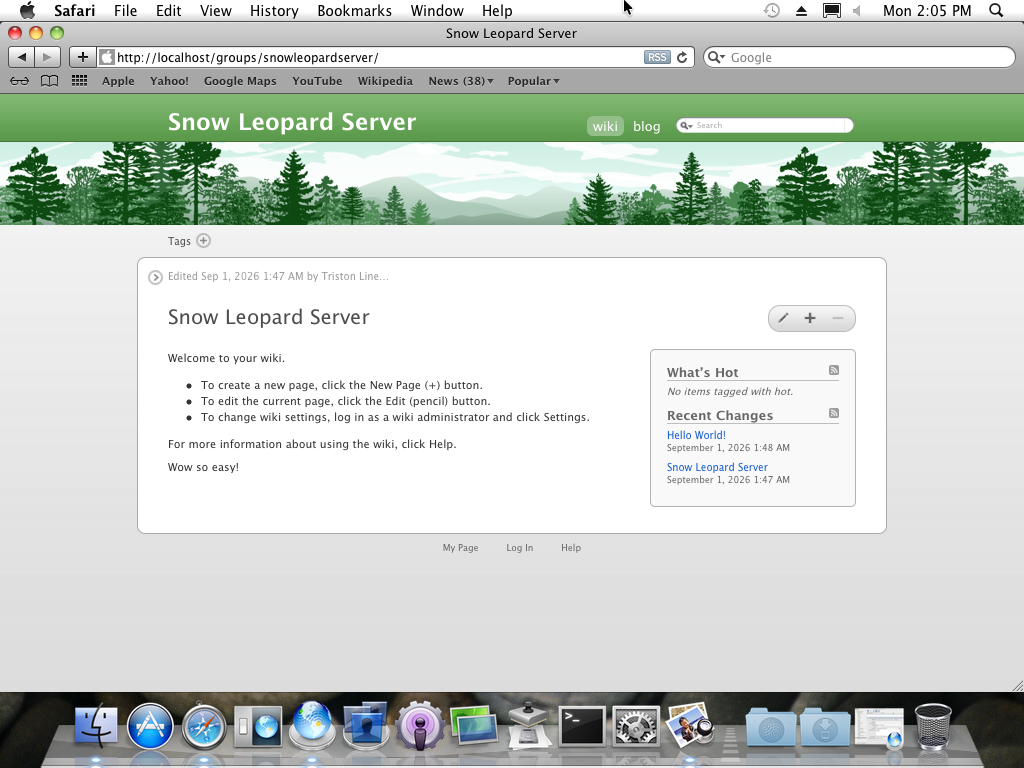
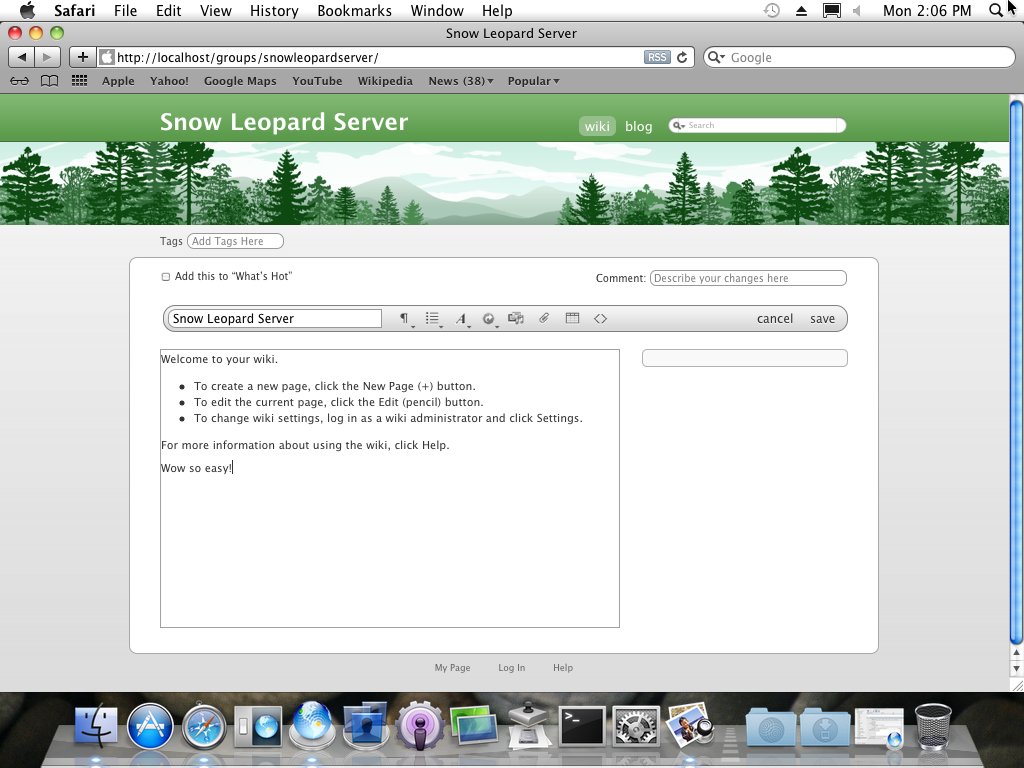
Remote Management works, though SSH needs old ciphers enabled on the client side before a modern OpenSSH will talk to it. VNC works, once the framebuffer is 32-bit. AFP works, though somewhat slowly from the Arctic over my OpenVPN server where I wrote this. The web server is far too old to be useful for anything, but I enjoyed using the built-in wiki and blog function for what might have been the first time, marvelling at how simple and yet functional it was in 2009. SMB is too old to interoperate with a current client, which is pretty much what you’d expect from a stack that stopped being patched around 2011. But locally the system talks to itself perfectly, and every authentication path I tried worked seamlessly, which is a strange thing to be impressed by until you remember that it was authenticating against a Kerberos realm nobody has touched in 15 years- but if it worked then, it will work now, right? Not always true, especially on other vendor’s systems that needed updates from day 1 that you definitely can’t find on any vendor servers and guides that will be so obscure by now even an LLM is going to blink at you dumbfounded by what you’re asking it. Worse yet, while using Google Search to resolve the above bugs, I was “helpfully” suggested commands that were intended for much newer Mac OS versions despite specifying the exact OS I was troubleshooting. Good luck getting archaic Linux and Windows servers working with their original softwares and no software updates.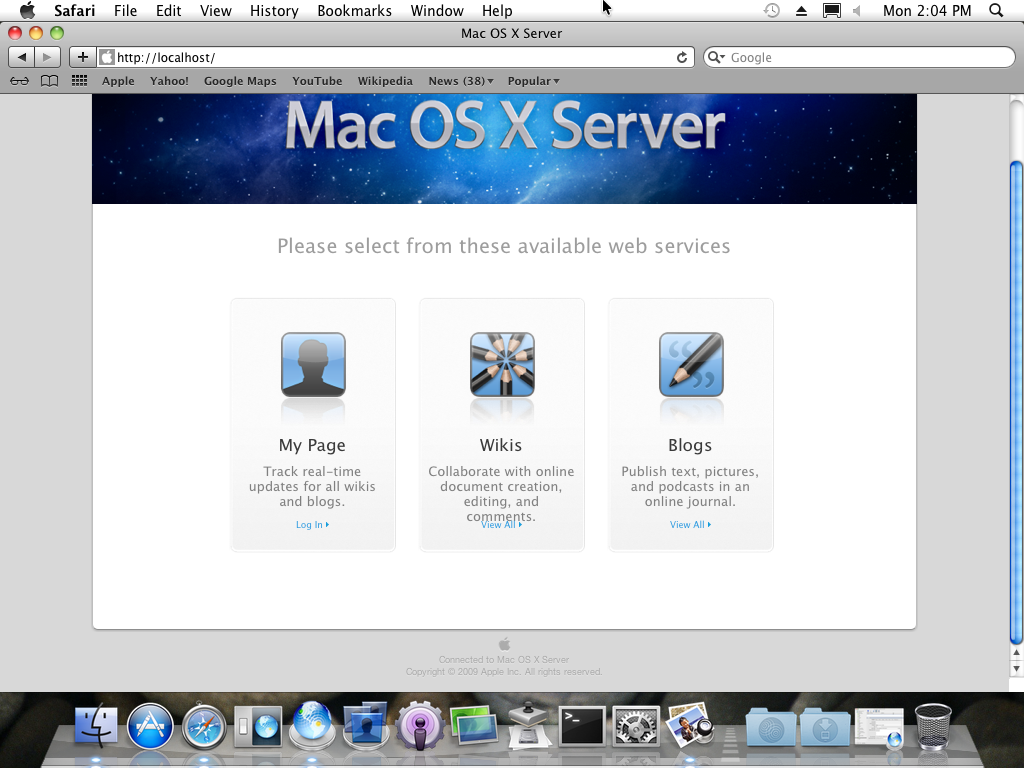
Surprisingly, as I hinted at above, Software Update still works and communicates with Apple’s servers in 2026. I’d assumed the update servers had been dead for a decade like everyone else’s, and I only attempted to update because I stumbled across a Facebook post claiming Tiger was still reaching an update server, which I thought must surely be incorrect. Once the VM had DNS configured properly, Software Update found 10 updates and downloaded them from an Apple domain. I failed to write down which host it contacted, so if you want to reproduce this you’ll need to watch the traffic yourself. Just make sure the DNS Server is configured with the correct forwarder! Mine was funny, the DNS Server was able to perform queries via dig but ping and other tools failed to resolve queries immediately, check the runbook I’ve written below for the steps I took to splash water on the DNS Server’s dazed face.
Before looking at the runbook, let me quickly reiterate that amazing fact: Apple is still serving updates for an operating system it shipped in 2009 and killed in 2011. Finally, I feel old and finally, I am impressed by Apple’s long term support commitments, which is hard to do after discovering forced obsolescence a few years ago.
The runbook
The full build and operations runbook is below, I put a lot of work into it but with the intention of perhaps mentoring someone, not sharing it to the world. Appendix A is a list of everything that failed and why, in the order it failed, including the several hours I spent configuring an ARD service that was crashing on startup. This document records the working configuration for running Mac OS X Server 10.6 as a virtual machine on the Proxmox VE cluster, together with the procedure used to build it and the operational constraints that apply to it. The configuration described here is the first combination of firmware, machine type, CPU model, bootloader, display adapter, and device topology that produced a complete and repeatable installation with working remote administration. Several other combinations were evaluated and failed. Those attempts are recorded in Appendix A so that the same ground does not have to be covered again, and so that the reasoning behind each choice remains visible to whoever inherits this system. This runbook assumes working familiarity with Proxmox VE administration, QEMU device topology, and the Linux command line. It does not assume prior experience with legacy Mac OS X virtualisation or with the Chameleon bootloader. In scope: host preparation, guest configuration, the installation procedure, the 10.6.8 update, remote administration, and the known limitations of the platform. Out of scope: configuration of the Mac OS X Server services themselves (Open Directory, AFP, Web, Wiki, and so on), backup policy, and the network design of the segment the VM sits on. Apple’s software licence agreement for Mac OS X Server restricts installation to Apple-branded hardware. Confirm the licensing position for this deployment with whoever owns the business relationship before the system is used for anything beyond isolated legacy access. Snow Leopard predates the UEFI-based Mac boot conventions that modern bootloaders such as OpenCore are built around, and the 10.6 installer volume uses an Apple Partition Map rather than the GPT layout that later releases use. In practice this means that the modern virtualisation recipe of OVMF plus OpenCore, which works well for Catalina and later, does not reliably discover a Snow Leopard installer at all. Three separate OpenCore configurations were tested and none of them presented the installer in the boot picker. The configuration that worked replaces that stack with the arrangement that was contemporary with the operating system itself: SeaBIOS as firmware, and Chameleon 2.1 as the bootloader. Chameleon performs its own scan for bootable Apple volumes rather than relying on firmware-level discovery, and it handles Apple Partition Map media correctly. Three further choices were driven by observed failures rather than preference. The CPU model is set to Penryn because Nehalem caused the guest to reset during the Darwin kernel handoff. The installer media was attached as a SATA hard disk rather than as optical media because legacy Apple bootloaders discover Apple-partitioned volumes far more reliably when they are presented as disks. The display adapter is VMware SVGA II rather than the Cirrus default because the Cirrus adapter produced a 16-bit framebuffer that crashed Apple’s VNC server on every frame. All three are documented in Appendix A with the specific symptoms that led to them. VirtIO devices must not be used for the system disk or the network interface. Snow Leopard has no drivers for them, and substituting VirtIO will produce a guest with no visible disk or no network. The guest reports The system volume was initialised inside the installer using Disk Utility with a GUID Partition Table and a single Mac OS Extended (Journaled) volume. The Snow Leopard installer disk that occupied Note that the guest’s own interface address is on a different subnet ( This is the single most important host-level setting, and its absence was responsible for the longest-running failure during the build. Without it, the guest entered an immediate reboot loop during Chameleon startup that looked like a bad bootloader image or an unsupported machine type, and considerable time was spent changing Q35 versions before the real cause was identified. Snow Leopard reads model-specific registers that KVM does not emulate. By default KVM injects a general protection fault on those accesses, which the guest treats as fatal. Setting Apply the setting at runtime: Confirm it took effect. Depending on how the running kernel represents the parameter, the value will read back as either Make the setting persistent across reboots: This is a host KVM module parameter, not a guest property, and it does not migrate with the VM. Every node in the cluster that is permitted to host VM 143 must carry the setting, otherwise the guest will fail to boot after a migration or after an HA restart on a node that has not been prepared. Either apply the modprobe configuration to all candidate nodes, or restrict the VM to a defined HA group whose members have all been configured. Note that Retrieve the live configuration at any time with: The configuration should reflect the baseline in section 2.2. The elements that matter most, and which are easy to lose during routine edits through the web interface, are the machine type, the CPU model, the display adapter, the disabled tablet, the IDE attachment of the Chameleon ISO, and the custom arguments described below. Three devices are supplied through the The OSK string is case-sensitive and must be reproduced exactly, including the parenthesised copyright marker. The keyboard is attached to the second EHCI controller. Attaching it to the first controller produced USB enumeration failures in the guest and left the installer without usable keyboard input. This was the second most time-consuming problem in the build after the MSR issue. Do not add a bare Bus names such as Then, at the monitor prompt: Locate the EHCI controllers in the output and confirm that the bus name referenced in the The following is the procedure that produced the working system. It is recorded in full so that the VM can be rebuilt from scratch if required. Create the VM with the baseline from section 2.2. Add a 64 GB QCOW2 disk on Verify the installer image before using it. A corrupt or truncated image produces failures that are easily mistaken for configuration problems. The expected values are: The image contains an Apple Partition Map with an HFS installer volume. Partition inspection on the host shows Convert the image and import it into Proxmox storage: Attach the resulting disk as The Attach The ISO should be a valid El Torito no-emulation boot image. Confirm this with Chameleon must be attached to IDE rather than SATA. When it was presented as a SATA optical device, the guest logged repeated SerialATAPI reconfiguration and reset errors during boot. Moving it to IDE resolved the fatal cases, although some SerialATAPI warnings may still appear harmlessly during startup. Start the VM. Chameleon should enumerate the attached volumes and present an entry named Select that entry, then enter the following boot arguments before continuing: The The 64 GB disk will not appear as an installation target until it has been partitioned. From the installer menu bar, open Utilities and then Disk Utility. Select the 64 GB QEMU disk, and partition it with a GUID Partition Table and a single Mac OS Extended (Journaled) volume. Quit Disk Utility and return to the installer. The volume will now be selectable as a destination. The installation is extremely slow in this configuration and completed over the course of several hours. The progress indicator is not trustworthy. The estimated time remaining routinely sat unchanged for ten minutes or more of real time before advancing by a single minute, and the progress animation appeared frozen for long stretches. This behaviour is expected and is not by itself evidence of a failure. Do not restart the VM because the interface looks motionless. Intervene only on clear evidence of a permanent failure, which means a kernel panic message on the verbose console, a reboot loop, or a guest that has stopped generating any host-side CPU activity over an extended period. Host CPU usage for the VM process is the most reliable signal available from outside the guest. After the installation completes, boot through Chameleon again and select the installed system volume rather than the installer. Continue to supply Complete the Mac OS X Server Setup Assistant. Confirm that the guest has obtained a DHCP lease through the E1000 adapter before proceeding, since the remainder of the work depends on network access to the guest. Apply the Mac OS X Server 10.6.8 Combo Update. Use the Server package rather than the client Snow Leopard combo update; the two are not interchangeable and applying the client package to a Server installation will produce an inconsistent system. Be aware that the update replaces the Apple Remote Desktop components. On this system it took After the update completes and the guest has rebooted successfully: This step is a prerequisite for remote administration and must be completed before configuring Screen Sharing. Apple’s Switch the display adapter on the host: Shut the guest down cleanly and start it again. A live migration or a reset is not sufficient, since the adapter is established at VM start. Verify from inside the guest: The adapter should now report vendor ID Two things about this adapter are worth knowing: The guest reports 3 MB of VRAM regardless of the 32 MB allocated on the host. That is the adapter’s own reporting and is not a problem in itself, since it is enough for the mode in use. There is no OS X driver for VMware SVGA II, so Increasing the resolution beyond the default VESA mode has not succeeded. An attempt to set 1920x1080x32 did not take effect. The likely reason is that Chameleon selects a mode from the VESA mode table the adapter advertises and cannot request one that is not in that list. With no OS X driver present, the available modes are whatever the VMware SVGA II VESA BIOS exposes, which does not appear to include widescreen modes at that size. Two further constraints are worth recording before anyone spends time on this: The mechanism for persisting Chameleon boot settings on this system is unverified. Chameleon 2.1 reads Installing Chameleon to the system disk rather than booting it from CD would give a writable Since remote administration works at the current resolution, this is a comfort issue rather than a functional one. With the display adapter corrected, activate Remote Management scoped to a named account: Prefer Verify: A running Note that Screen Sharing on this guest listens on TCP 5900 and carries no meaningful transport security. Do not expose that port between network segments. Open an SSH tunnel from the administrative workstation instead. SSH on this guest listens on a non-default port: The tunnel destination must be Local ports below 1024 also require privilege on the workstation, which is why an early attempt at With the tunnel established, connect from Finder using Go and then Connect to Server, with the address: This gives correct pointer behaviour, a responsive desktop, and no additional exposed service. It is the normal method of graphical administration for this system. The Proxmox noVNC console remains available and is the correct tool for recovery work: reaching the Chameleon boot prompt, reading a verbose boot, or diagnosing a guest that has lost its network. It is not suitable for routine use, because pointer synchronisation through the relative USB mouse is poor enough to make ordinary interface work impractical. Three things in the guest’s Connections appear with a local address of A run of entries in With both virtual CPUs active, Mac OS X Server 10.6.3 panicked almost immediately during boot: The panic occurred in XNU 1504.3.12 and implicated CPU 1. The workaround during the build was the The VM is now configured with a single core, which makes the boot argument redundant. Testing SMP under 10.6.8 therefore requires setting Change one variable at a time. Do not adjust the CPU model, core count, and boot arguments together, because the failure modes are similar enough that a combined change gives no useful information about which element was responsible. Snapshots are working. The VM currently has a parent snapshot named The earlier report that snapshots were unavailable was resolved by detaching the Snow Leopard installer disk from Take a clean snapshot now that remote administration is working, before any further experimentation. During the VNC diagnosis the guest firewall was disabled to rule it out as a cause. Two changes remain in place and must be reverted: currently returns only A reboot will reload the ipfw ruleset from the firewall service configuration, or the firewall can be re-enabled through Server Admin. Confirm afterwards that the original ruleset is back, which included the deny-by-default rule at 65534 and explicit allows for SSH, port 311, and port 625. This is the highest-priority item in the backlog: the guest is currently running with no host-level filtering at all. The string The manually written Proxmox’s absolute pointer device caused USB enumeration trouble in the guest, logged as: along with extended stalls during boot. The tablet was therefore disabled and replaced with a relative USB mouse, which works but tracks poorly through the web console. Archived QemuUSBTablet 1.1 and 1.2 installer packages were located and tested, but installation failed on this guest. No further work is planned on that path, because Screen Sharing solves the problem well enough that improving the console experience has little value. Two recurring log entries are unrelated to anything documented here and can be ignored or suppressed: A Confirm before starting the VM: This appendix records what was tried and did not work. Its purpose is to prevent the same options from being reconsidered from scratch, and to make clear which configuration choices are deliberate rather than arbitrary. The initial approach used Q35 with OVMF firmware, LongQT OpenCore v0.7, a Nehalem CPU model, and the Snow Leopard ISO attached as a CD-ROM. OpenCore loaded correctly, but the picker offered only Converting the installer to a SATA hard disk, which later proved important under Chameleon, did not help OpenCore find it either. A Snow Leopard specific OpenCore image from the LegacyOSXKVM project was then tested and presented a different interface, but its only entry was The conclusion is that OpenCore, at least in the versions tested, is not a viable bootloader for a Snow Leopard Server installation of this vintage. The Apple Partition Map layout of the 10.6 installer is the most likely reason, since OpenCore’s discovery logic is built around the GPT and EFI conventions of later releases. One dead end is worth recording separately: OpenCore was at one point tested with SeaBIOS rather than OVMF, which produced only After switching to SeaBIOS and Chameleon, the VM entered an immediate reboot loop during Chameleon startup. The ISO was verified as a valid El Torito bootable image, so the image itself was not at fault. Several Q35 machine versions were tried without effect. The actual cause was KVM’s default handling of unsupported model-specific register accesses. Enabling The lesson worth carrying forward is that a bootloader failing this early is at least as likely to be a host virtualisation problem as a guest configuration problem, and the host side is worth checking before working through machine type permutations. With the CPU model set to Nehalem, Chameleon could start the installer, but the VM reset during the handoff to the Darwin kernel. Changing only the CPU model to Penryn, with every other parameter left alone, allowed the installer to proceed substantially further and ultimately to complete. Penryn is therefore the known-working model and should not be changed without a specific reason and a snapshot to fall back on. Presenting the installer as a SATA hard disk rather than as ATAPI optical media was necessary for Chameleon to find it reliably. Legacy Apple bootloaders are noticeably better at discovering Apple-partitioned volumes on disk devices than they are at driving emulated optical discovery. This is the reverse of the usual expectation, where installer media is attached as a CD-ROM, and it is easy to undo by accident during routine maintenance. This is the most instructive failure in the build, because every visible symptom pointed at access control and the actual fault was in the framebuffer. Symptoms. After the 10.6.8 Server combo update, Screen Sharing stopped working. SSH tunnels to port 5900 returned repeating roughly every seven seconds, with a corresponding crash report written to Time spent on the wrong causes. Considerable effort went into ARD access control before the crash reports were read: repeated Diagnosis. The crash report register state identified the fault precisely. The crashing thread was in The guest configuration explained why: Apple’s VNC server assumes a 32-bit framebuffer. The Cirrus adapter was providing a 16-bit one. The 1 MB of VRAM was a second, independent obstacle: a 32-bit 1024x768 framebuffer requires roughly 3 MB, so the depth could not have been raised on that adapter regardless. Resolution. Changing the display adapter to What to take from this. The crash reports contained the answer from the first minute of the failure. Reading Host, KVM MSR handling: Host, VM inspection and configuration: Chameleon boot arguments (installation and single-CPU boots): Guest, system verification: Guest, enable Apple Remote Management for a named user: Guest, verify the VNC server is alive: Guest, firewall state: Workstation, shell and tunnelled Screen Sharing: Then connect to Mac OS X Server 10.6 on Proxmox VE 8.2.2: build and operations runbook
Mac OS X Server 10.6 on Proxmox VE 8.2.2
Build and Operations Runbook
Field Value System SnowLeopardServer (hostname withheld) VM ID 143 Site Withheld Current host node pveN Virtualisation platform Proxmox VE 8.2.2 / QEMU 8.1.5 Guest operating system Mac OS X Server 10.6.8 (build 10K549) Bootloader Chameleon 2.1 r2069 Status Operational, remote administration restored Revision 1.1 Revision history
Rev Change 1.0 Initial build documentation at 10.6.3 1.1 10.6.8 update applied. Documents the AppleVNCServer colour-depth crash and the display adapter change that resolved it. Corrects the storage and snapshot sections, which the build has since moved past. 1. Purpose and scope
1.1 Audience
1.2 Scope
1.3 Licensing
2. System summary
2.1 Design rationale
2.2 Configuration baseline
Parameter Value Reason BIOS SeaBIOS Required by Chameleon; OpenCore paths were rejected Machine type pc-q35-2.5 Known working; Q35 version changes did not affect the outcome CPU model Penryn Nehalem reset during kernel handoff Sockets / cores 1 / 1 See section 8.1 on the SMP restriction Memory 4096 MB Ballooning disabled Display adapter vmware,memory=32Cirrus default gave a 16-bit framebuffer that crashed AppleVNCServer Network adapter Intel E1000 VirtIO is not supported by the guest Tablet pointer Disabled Caused USB enumeration stalls in the guest Bootloader media Chameleon 2.1 r2069 on IDE CD-ROM SATA attachment caused SerialATAPI reset errors Firmware boot order ide2 only Chameleon performs its own volume discovery ostype: l26. This is cosmetic and affects only some Proxmox defaults, but it is inaccurate and worth correcting to other during the next maintenance window.2.3 Storage layout
Device Contents Format Size Retention sata0 Installed Mac OS X Server system volume QCOW2 on NFS-STORE, discard=on64 GB Permanent ide2 Chameleon 2.1 r2069 ISO ISO on local storage 22 MB Permanent, required at every boot unused0 Stale disk from the abandoned OpenCore attempt RAW on NFS-STORE Varies Delete sata1 during the build has been detached. The unused0 RAW image from the OpenCore attempt is still present and should be deleted, though it is not currently blocking anything (see section 8.2).2.4 Architecture
Proxmox VE 8.2.2 / QEMU 8.1.5, node pveN
  |
  +-- KVM module: ignore_msrs = 1  (host-level prerequisite)
  |
  +-- VM 143  SnowLeopardServer
        |
        +-- Firmware .......... SeaBIOS
        +-- Machine ........... pc-q35-2.5
        +-- CPU ............... Penryn, 1 socket x 1 core
        +-- Memory ............ 4096 MB, ballooning off
        +-- SMC ............... isa-applesmc with Apple OSK
        +-- Display ........... VMware SVGA II, 32 MB
        +-- Network ........... Intel E1000 on vmbrN, firewall on
        |
        +-- ide2 .............. Chameleon 2.1 r2069
        +-- sata0 ............. 64 GB QCOW2, Mac OS X Server 10.6.8
        |
        +-- USB keyboard ...... bus ehci-2.0
        +-- USB mouse ......... bus ehci.0 port 2 (recovery only)

Administrative path:
  Workstation --> SSH on a non-default port to server.example.lan
                    +-- SSH shell
                    +-- Screen Sharing over a tunnel to 127.0.0.1:5900
10.0.0.x) from the address you connect to (server.example.lan). There is address translation between the administrative LAN and the guest segment. This matters when reading netstat output from inside the guest and when constructing SSH tunnels, as described in section 7.1.3. Host prerequisites
3.1 KVM model-specific register handling
ignore_msrs causes KVM to return zero for unhandled reads and silently discard unhandled writes instead.echo 1 > /sys/module/kvm/parameters/ignore_msrs
Y or 1:cat /sys/module/kvm/parameters/ignore_msrs
echo "options kvm ignore_msrs=Y" > /etc/modprobe.d/kvm.conf
update-initramfs -k all -u
3.2 Cluster-wide applicability
ignore_msrs weakens the guest-to-host boundary slightly, because it hides guest behaviour that would normally raise a fault. That is an acceptable trade for a legacy workload on a controlled network segment, but it should be a deliberate decision rather than an accident, and it is a reason to keep this VM on nodes where the exposure is understood.4. Guest configuration reference
4.1 Proxmox configuration
qm config 143
4.2 Custom QEMU arguments
args line because Proxmox has no native interface for them. The Apple SMC device is mandatory, since Darwin refuses to boot without a system management controller presenting Apple’s OSK string. The two USB devices exist because the default Proxmox input configuration does not work with this guest.args: -device isa-applesmc,osk="ourhardworkbythesewordsguardedpleasedontsteal(c)AppleComputerInc" -device usb-mouse,id=mouse,bus=ehci.0,port=2 -device usb-kbd,id=keyboard,bus=ehci-2.0
-usb flag to the arguments. Proxmox already instantiates the ICH9 USB controllers as part of the Q35 machine definition, and a second set collides with them:PCI: slot 29 function 7 not available for ich9-usb-ehci1
4.3 Verifying device placement
ehci-2.0 are derived from device identifiers that Proxmox assigns when it builds the QEMU command line, and they are not guaranteed to be stable across Proxmox or QEMU upgrades. If the guest loses keyboard input after a host upgrade, confirm the actual controller topology rather than assuming the argument is still valid. From the QEMU monitor for the running VM:qm monitor 143
info qtree
args line still exists.5. Build procedure
5.1 Create the virtual machine
NFS-STORE attached as sata0. Do not select VirtIO for either the disk or the network adapter. Set the display adapter to vmware with 32 MB. Disable ballooning and disable the tablet pointer before first boot.5.2 Verify and stage the installer media
sha1sum MAC_OS_X_10-6-3_SNOW_LEOPARD_SERVER.ISO
Property Value Size 7,619,510,272 bytes SHA-1 1244e5e3afc73a2cba792f57dae54bb7f3a5575a Apple_partition_map, Apple_Drive_ATAPI, Apple_Free, and Mac_OS_X.hfs.qemu-img convert -p -f raw -O qcow2 \
/var/lib/vz/template/iso/MAC_OS_X_10-6-3_SNOW_LEOPARD_SERVER.ISO \
/tmp/SnowLeopardServer-Installer.qcow2
qm disk import 143 /tmp/SnowLeopardServer-Installer.qcow2 NFS-STORE --format qcow2
sata1.--format qcow2 flag is important. Without it, qm disk import writes in the target storage’s default format, which is why the original import landed on the NFS store as RAW. That produced the stale unused0 RAW image still attached to this VM.5.3 Attach the bootloader
Chameleon-2.1-r2069.iso as an IDE CD-ROM on ide2, and set the firmware boot order to ide2 only. Chameleon does not need any other device in the boot order, because it scans for bootable Apple volumes itself once it has started.file if there is any doubt about the source of the image.5.4 Boot Chameleon and start the installer
Mac OS X Server Install Disc.cpus=1 -v
cpus=1 argument restricts the Darwin kernel to a single processor, which is required because 10.6.3 panics almost immediately under SMP in this environment. The -v argument enables verbose boot, which is worth keeping for the whole build because it turns an opaque grey screen into a readable log when something goes wrong.5.5 Initialise the destination volume
5.6 Run the installation
5.7 First boot
cpus=1 -v at the prompt.6. Post-installation
6.1 Apply the 10.6.8 Server combo update
ARDAgent.app and AppleVNCServer.bundle to version 3.5.4 and broke remote administration outright, for the reasons given in section 6.3. Plan for the guest to be reachable only over SSH and the Proxmox console until that is dealt with.6.2 Verification
sw_vers
uname -a
sysctl hw.ncpu
sw_vers should report version 10.6.8, build 10K549.6.3 Display adapter and colour depth
AppleVNCServer copies the console framebuffer scanline by scanline and assumes 32 bits per pixel. With the Proxmox default Cirrus adapter, the guest ran at 1024x768 in 16-bit ARGB1555. The server therefore read 4096 bytes per row from a framebuffer whose rows were 2048 bytes, ran 2048 bytes past the end of the mapped region on every frame, and took a bus error. Full diagnosis in Appendix A.5.qm set 143 --vga vmware,memory=32
system_profiler SPDisplaysDataType
0x15ad and device ID 0x0405, which is VMware SVGA II. If it still reports vendor 0x1013 (Cirrus), the change did not take effect and there is no point configuring Screen Sharing, because it will simply resume the crash loop.system_profiler reports a bare Display Connector: with no resolution or pixel depth listed, and no kernel extension is loaded. The guest runs in a plain VESA mode. This is cosmetically unsatisfying but functionally correct: the mode is 32-bit, which is all the VNC server requires.6.4 Resolution
/Extra/org.chameleon.Boot.plist, but it locates that file relative to the volume it booted from, and here it boots from a read-only ISO. Whether it also searches the HFS+ system volume has not been established. Note that /Library/Preferences/SystemConfiguration/com.apple.Boot.plist is read by Apple’s own boot.efi on genuine hardware and is not consulted by Chameleon, so editing it will have no effect./Extra and remove the dependency on removable media. That is worth doing on its own merits and would also settle this question. It is item 4 in the backlog.6.5 Enable remote management
sudo /System/Library/CoreServices/RemoteManagement/ARDAgent.app/Contents/Resources/kickstart \
-activate -configure -access -on -users adminuser -privs -all -restart -agent -console
-users <name> over -allowAccessFor -allUsers. The latter grants remote control to every local account and there is no reason to configure it that way on a system with a known administrator.ps aux | grep '[A]ppleVNCServer'
netstat -an | grep 5900
ls -lt /Library/Logs/DiagnosticReports/ | head -5
AppleVNCServer process, a persistent *.5900 LISTEN socket, and no crash report newer than the last reboot together confirm success.launchctl list will not show a job named com.apple.AppleVNCServer. On this system the com.apple.ServerSetup_AppleVNCServer launchd job is unloaded, and the VNC server runs as a child of ARDAgent instead. This is a working arrangement and the absence of a launchd entry is not a fault. Use ps rather than launchctl to check whether the server is alive.7. Remote administration
7.1 Screen Sharing over an SSH tunnel
ssh -p 2222 -L 5901:127.0.0.1:5900 [email protected]
127.0.0.1, resolved from the guest’s own perspective. Using the guest’s external address as the forward target fails, because address translation sits between the administrative LAN and the guest segment:ssh -L 5901:server.example.lan:5900 ... --> Operation timed out
ssh -L 5901:127.0.0.1:5900 ... --> works
-L 446:127.0.0.1:445 was refused with bind: Permission denied. Use high-numbered local ports.vnc://localhost:5901
7.2 Console access
7.3 Interpreting netstat from inside the guest
netstat output look wrong at first glance and are not:tcp46 *.5900 LISTEN is a single dual-stack socket accepting both IPv4 and IPv6 connections, not two conflicting listeners.10.0.0.106 rather than server.example.lan, because the latter is the translated address you connect to and the former is the guest’s own interface.TIME_WAIT with no ESTABLISHED entry is the signature of a server accepting connections and then dying. During the crash loop this was the clearest single indicator that the problem was server-side rather than a firewall or a tunnel fault.8. Known constraints and outstanding work
8.1 CPU configuration
panic(cpu 1 ...): Spinlock acquisition timed out
cpus=1 boot argument.cores: 2 in the Proxmox configuration first, and there is no longer any reason to expect a different outcome without doing so. If that test is attempted:cores to 2 and shut the guest down cleanly.-v alone, omitting cpus=1.sysctl hw.ncpu, which should report 2.8.2 Snapshots
Pre-Display-Post-1068, taken after the 10.6.8 update and before the display adapter change.sata1. The remaining unused0 RAW image from the abandoned OpenCore attempt is evidently not blocking snapshot creation, but it is consuming NFS space for nothing and should be deleted.8.3 Firewall state requires restoration
sudo ipfw list
65535 allow ip from any to any, meaning all filtering is off. The application firewall socket filter kext was also unloaded with socketfilterfw -d.8.4 Credential exposure in logs
Secret123 was passed as an argument to kickstart under sudo on two occasions and is recorded in cleartext in /var/log/system.log. Any VNC password set during the diagnosis should be considered compromised and changed. When setting a VNC password, avoid passing it on a command line under sudo for this reason./Library/Preferences/com.apple.RemoteManagement.vncpasswd file and the hand-set VNCServerLegacy and VNCPasswordValid preference keys were removed during the diagnosis and the preference domain was reset. The current working configuration does not depend on any of them.8.5 Pointer input through the Proxmox console
IOUSBFamily is having trouble enumerating a USB device
8.6 Unrelated noise in the logs
org.clamav.clamd fails to start every ten seconds with Malformed database, because the bundled virus definitions are long expired and cannot be refreshed. Unload the job if the log noise is a nuisance.Podcast Composer crash report appeared during the build. It is an ImageKit tooltip fault in a Server application that is not in use, and has no connection to remote administration or the display configuration.8.7 Outstanding work
# Item Priority Status 1 Restore ipfw ruleset and reload the socket filter kext High Pending 2 Change any VNC password exposed in system.log High Pending 3 Take a clean snapshot of the working configuration High Pending 4 Install Chameleon to the system disk, removing the CD dependency Medium Not started 5 Apply persistent ignore_msrs to all candidate nodesMedium Pending 6 Delete the stale unused0 RAW diskLow Pending 7 Correct ostype from l26 to otherLow Pending 8 Revisit resolution once Chameleon config is persistent Low Deferred 9 Test SMP operation with cores: 2Low Deferred 10 Document the service configuration Low Not started 9. Startup checklist
Layer Item Required value Host KVM ignore_msrsEnabled on the node the VM will start on VM BIOS SeaBIOS VM Machine type pc-q35-2.5 VM CPU model Penryn VM Memory 4096 MB, ballooning disabled VM Display adapter vmware,memory=32, never CirrusVM Tablet Disabled VM Network adapter E1000 VM args lineAppleSMC, USB keyboard, USB mouse present Storage ide2 Chameleon ISO attached Storage sata0 64 GB QCOW2 system disk Boot Firmware boot order ide2 only Appendix A: Approaches evaluated and rejected
Approach Outcome OVMF and LongQT OpenCore v0.7 with the installer as a CD-ROM Installer never appeared in the picker OVMF and LongQT OpenCore v0.7 with the installer as SATA No improvement LegacyOSXKVM Snow Leopard OpenCore image Only OpenShell.efi was presented SeaBIOS with OpenCore Invalid combination; OpenCore requires EFI Chameleon with default KVM MSR handling Immediate reboot loop Nehalem CPU model Reset during Darwin kernel handoff Two active vCPUs on 10.6.3 Spinlock panic on CPU 1 Chameleon attached as SATA optical media Fatal SerialATAPI reset errors USB keyboard on the first Q35 USB controller Enumeration failure, no keyboard input Adding a bare -usb argumentPCI slot collision, VM would not start Proxmox tablet pointer enabled USB enumeration stalls in the guest QemuUSBTablet 1.1 and 1.2 packages Installation failed on the guest Cirrus display adapter after the 10.6.8 update AppleVNCServer bus error on every frame ARD kickstart flags, VNC legacy mode, manual password file No effect; the fault was in the framebuffer, not access control Chameleon Graphics Mode set to 1920x1080x32Did not take effect A.1 OpenCore did not discover the installer
Reset NVRAM and Toggle SIP. The installer volume never appeared. Pressing Space to reveal auxiliary entries and moving the optical media to different controllers made no difference.OpenShell.efi.Booting from Hard Disk... and no picker at all. That was an invalid pairing rather than a meaningful test result. OpenCore requires an EFI environment, and SeaBIOS is correct only for Chameleon.A.2 The Chameleon reboot loop was a host problem, not a bootloader problem
ignore_msrs on the host resolved the loop completely, after which Chameleon started normally and correctly enumerated Mac OS X Server Install Disc.A.3 CPU model selection
A.4 Installer media presentation
A.5 AppleVNCServer crash loop after the 10.6.8 update
Connection refused most of the time. An nmap scan reported the port as filtered. Inside the guest, netstat showed a run of connections in TIME_WAIT with nothing ESTABLISHED, and the listening socket on 5900 appeared and disappeared. The system log showed:com.apple.launchd[1] (com.apple.AppleVNCServer[3544]): Job appears to have crashed: Bus error
com.apple.launchd[1] (com.apple.AppleVNCServer): Throttling respawn: Will start in 10 seconds
/Library/Logs/DiagnosticReports/ each time.kickstart invocations with different privilege and user scopes, enabling VNC legacy mode, setting a VNC password through both supported and unsupported flag combinations, writing a password hash directly into /Library/Preferences/com.apple.RemoteManagement.vncpasswd with a perl one-liner, unloading and reloading launch daemons, and finally flushing the entire ipfw ruleset and unloading the application firewall kext. None of it had any effect, because a daemon that segfaults on startup cannot be configured into working.__memcpy, with:rbx: 0x0000000000001000 4096 bytes = 1024 px at 32 bpp
r15: 0x0000000000000800 2048 bytes = 1024 px at 16 bpp
rcx: 0xfffffffffffff800 -2048 = the overrun
cr2: 0x0000000100680000 fault address, on a page boundary
AppleVNCServer was copying the framebuffer at 4096 bytes per scanline while the actual framebuffer rows were 2048 bytes, overrunning the mapped region by exactly 2048 bytes on every frame. SIGBUS rather than SIGSEGV confirmed this was an overrun off the end of a memory-mapped device region rather than a heap fault.Pixel Depth: 16-Bit Color (ARGB1555)
Resolution: 1024 x 768
VRAM (Total): 1 MB
Vendor ID: 0x1013 (Cirrus Logic)
Device ID: 0x00b8 (GD 5446)
vmware,memory=32 and restarting the guest produced a 32-bit framebuffer, after which AppleVNCServer started cleanly and stayed running. No ARD configuration change was required beyond the standard activation./Library/Logs/DiagnosticReports/ before adjusting service configuration would have saved several hours. When a network service is intermittently reachable and then refuses connections, check whether the daemon is alive before investigating access control, firewalls, or tunnels.Appendix B: Symptom reference
Symptom Probable cause Action VM reboots repeatedly during Chameleon startup ignore_msrs not set on the current host nodeApply the setting from section 3.1 to that node VM resets during Darwin kernel boot CPU model is not Penryn Correct the CPU model panic(cpu 1 ...): Spinlock acquisition timed outSMP under Snow Leopard Set cores: 1, or boot with cpus=1Chameleon shows no bootable Apple volume Installer attached as optical media, or missing from the VM Attach the installer image as a SATA disk Boot picker shows only Booting from Hard Disk...OpenCore paired with SeaBIOS Not a supported path; use Chameleon No keyboard input at the Chameleon prompt or in the installer Keyboard on the wrong USB controller Confirm the keyboard is on ehci-2.0; verify topology per section 4.3PCI: slot 29 function 7 not available for ich9-usb-ehci1A -usb flag was added to argsRemove it; Q35 provides the controllers already IOUSBFamily is having trouble enumerating a USB device, long stallsProxmox tablet pointer enabled Set tablet: 0SerialATAPI Terminating due to unrecoverable Reset errorChameleon attached as SATA optical media Move the ISO to ide2Installer appears frozen, ETA static for many minutes Expected behaviour Wait; check host-side CPU activity before intervening AppleVNCServer ... Job appears to have crashed: Bus error, repeatingFramebuffer is not 32-bit Set --vga vmware,memory=32; see Appendix A.5VNC refuses connections, port shows filtered to nmapVNC server crashing on startup Check ps and /Library/Logs/DiagnosticReports/ before touching ARD configGuest netstat shows only TIME_WAIT on 5900, never ESTABLISHEDServer accepting then dying As above; this is a server fault, not a firewall fault launchctl list shows no com.apple.AppleVNCServer jobServerSetup launch daemon unloaded; ARDAgent owns the process Expected. Check with ps aux | grep '[A]ppleVNCServer'SSH tunnel to 5900 times out Forward target set to the guest’s external address Target 127.0.0.1, not the translated addressbind: Permission denied on an SSH local forwardLocal port below 1024 Use a high-numbered local port system_profiler reports no resolution or pixel depthNo OS X driver for VMware SVGA II Expected and harmless; the VESA mode is still 32-bit Chameleon Graphics Mode has no effectMode not in the adapter’s VESA table, or config file not read from the ISO boot volume See section 6.4 The current guest configuration does not support taking new snapshotsRAW disks attached to the VM Detach the installer disk; see section 8.2 org.clamav.clamd respawning every 10 secondsExpired virus definitions Unrelated to anything here; unload the job Appendix C: Command reference
echo 1 > /sys/module/kvm/parameters/ignore_msrs
cat /sys/module/kvm/parameters/ignore_msrs
echo "options kvm ignore_msrs=Y" > /etc/modprobe.d/kvm.conf
update-initramfs -k all -u
qm config 143
qm monitor 143
qm set 143 --vga vmware,memory=32
sha1sum MAC_OS_X_10-6-3_SNOW_LEOPARD_SERVER.ISO
qemu-img convert -p -f raw -O qcow2 \
  /var/lib/vz/template/iso/MAC_OS_X_10-6-3_SNOW_LEOPARD_SERVER.ISO \
  /tmp/SnowLeopardServer-Installer.qcow2

qm disk import 143 /tmp/SnowLeopardServer-Installer.qcow2 NFS-STORE --format qcow2
cpus=1 -v
sw_vers
uname -a
sysctl hw.ncpu
system_profiler SPDisplaysDataType
sudo /System/Library/CoreServices/RemoteManagement/ARDAgent.app/Contents/Resources/kickstart \
  -activate -configure -access -on -users adminuser -privs -all -restart -agent -console
ps aux | grep '[A]ppleVNCServer'
netstat -an | grep 5900
ls -lt /Library/Logs/DiagnosticReports/ | head -5
syslog -k Sender AppleVNCServer | tail -n 50
sudo ipfw list
ssh -p 2222 [email protected]
ssh -p 2222 -L 5901:127.0.0.1:5900 [email protected]
vnc://localhost:5901.
It’s also available as a PDF and as raw Markdown because my site is already written in Markdown thanks to Zola. Site, hostname, node, storage pool, bridge, addresses, username, and SSH port have been replaced with placeholders as you might expect.
What I’d have done with it
What I actually feel about all of this is less nostalgia in hindsight than a fairly specific envy of a version of myself who never existed.
When I was 12 or 13, I ran an unlimited-client server operating system in order to file share and host a VPN for my friends to play games on it. I mean, it was a completely reasonable use of it, and I don’t regret it. But I had, sitting in a dining room, the thing I now spend hours helping other people assemble out of parts, and I had no idea what it was worth. If I’d been 25 with the same DVD, I’d have volunteered the resources to people who needed them. I’d have hosted file servers and VPNs for non-profits that couldn’t afford either. I’d have started writing on the internet a decade earlier than I did.
And I’m aware that even the version of this scenario I got was lucky. Most jobs wouldn’t have put me anywhere near a copy of Mac OS X Server. It took a repair shop that had a surplus of Macintoshes, an owner willing to hand a teenager a licence, and a grandfather with a dining room desk in the corner he was prepared to lose to a 20-inch iMac with no screen. Take any one of those away and I might not have become the successful IT guy writing this article.
Keeping it
I don’t think this is the kind of product that comes back, and I’ve stopped looking for a solution that will replace it. :-/
Over time, I’ve realized that the reason is structural rather than a failure of will. Every open source project optimizes for its own users, and the integration layer between projects has no natural owner. Nobody wakes up wanting to maintain the glue that makes Dovecot, Radicale, Samba, and WireGuard share one user database and one certificate store, because it’s unglamorous, it breaks whenever anything upstream changes, and it only pays off for the person who wants all of them at once. The organizations that did try to own it had to fund it directly, and the market for a $500 unified server was too small to pay for a team that size. Apple never funded it from the software product anyway, Snow Leopard Server was a loss leader for Xserve and Mac mini hardware, and its documentation team existed because Apple already had one for the client OS. When the iPhone made the Mac a secondary business, the subsidy went, and the product went with it. Microsoft’s Small Business Server was the same story with a channel-partner subsidy instead of a hardware one. The elegance of Mac OS X Server and lagging rivals was never economically self-supporting, which says pretty much everything about its downfall.
Setting aside the elegance, the ease of use, and the deployment time, things like security, flexibility, maintainability, extensibility, performance, capacity, observability, and more have improved since 2011. I run a Proxmox VE cluster precisely because those improvements have come down the pipe and software products like Proxmox VE are so well integrated. But on deployment time and ease of use for a single box serving a few hundred people, nothing has beaten 10.6.8, and the VM proved it to me twice over, because the same person with 15 more years of experience found the software just as quick and easy to use as he found it at 13. What changed in the intervening years was never the standard itself, only the fact that nobody is competing on it any more, not even Microsoft.
The people I mentor are spending 2 hours deploying Pi-hole, several multi-hour sessions standing up a Proxmox cluster, and an afternoon fighting WireGuard before I can VPN in and hand-edit anything myself. They’re more capable than I was at 11. The difference is that I learned by looking at a working system and asking what each checkbox did to it, and they’re learning by debugging systems they have never once seen work, which inverts the order entirely and puts troubleshooting before comprehension. Some people may say that troubleshooting is the ultimate form of learning, but it fails to convey the purpose of a thing and reduces the motivation to use it. When everything is an uphill battle, you tire yourself out, and in some cases you end up demoralized.
So the archive above is sort of the actual point of this post. The guides are off Apple’s servers, the update DMGs are behind a donation wall on a preservation site, and the operating system now requires a page of QEMU incantations and chants to boot at all. The demand to make it better doesn’t really exist, so I hope my troubleshooting helps someone. I’ve mirrored the documentation because I’d rather it exist in more than one place, and I’ve published the runbook because the next person shouldn’t have to spend hours on a VNC server that was segfaulting the entire time.
I’m going to write about the other half of this eventually, the part where the reason I got into infrastructure at all was because of video games and RAM limits. The speculative title will probably be Why I’m So Fortunate Not to Be a Software Developer, and it starts with three iMacs and a 4 GB ceiling. For today, I hope you enjoyed this personal examination of history.